


- Open File Explorer from the taskbar or the Start menu, or press the Windows logo key + E.
- Select This PC from the left pane. Then, on select the 3 dot tab
 , select Map network drive.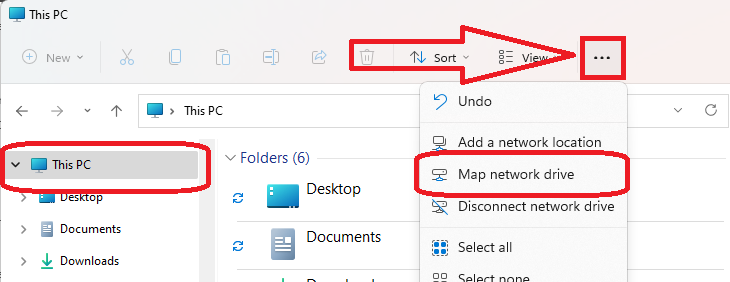
- In the Drive list, select a drive letter. (Any available letter will do.)
- In the Folder box, type the path of the folder or computer, or select Browse to find the folder or computer or Type in the folder path. To connect every time you log on to your PC, select the Reconnect at sign-in check box.
- Select Finish.

Note: If you can't connect to a network drive or folder, the computer you're trying to connect to might be turned off or you might not have the correct access.
SharkLink
SharkLink is NSU's online portal. With a single username and password, students, alumni, faculty, and staff members can easily access many online university applications.
Quick Guide
Students (PDF)Microsoft Online Archive
Faculty and Staff (PDF)
Current Hours of Operation
Monday-Friday: 8:30 a.m. – 5 p.m.
Saturday: Closed
Sunday: Closed
Closed on University Holidays
Holiday Schedule
Help Number for Students:
(954) 262-4357
Toll Free:
800-541-6682 ext. 24357
Help Number for Staff:
(954) 262-0070