


NSU Explorance Blue Website Address
Explorance Blue in Canvas
For students to access their course evaluations in Canvas, the instructor must enable the tool in each Canvas course.
- Login to Canvas.
- Navigate to the course.
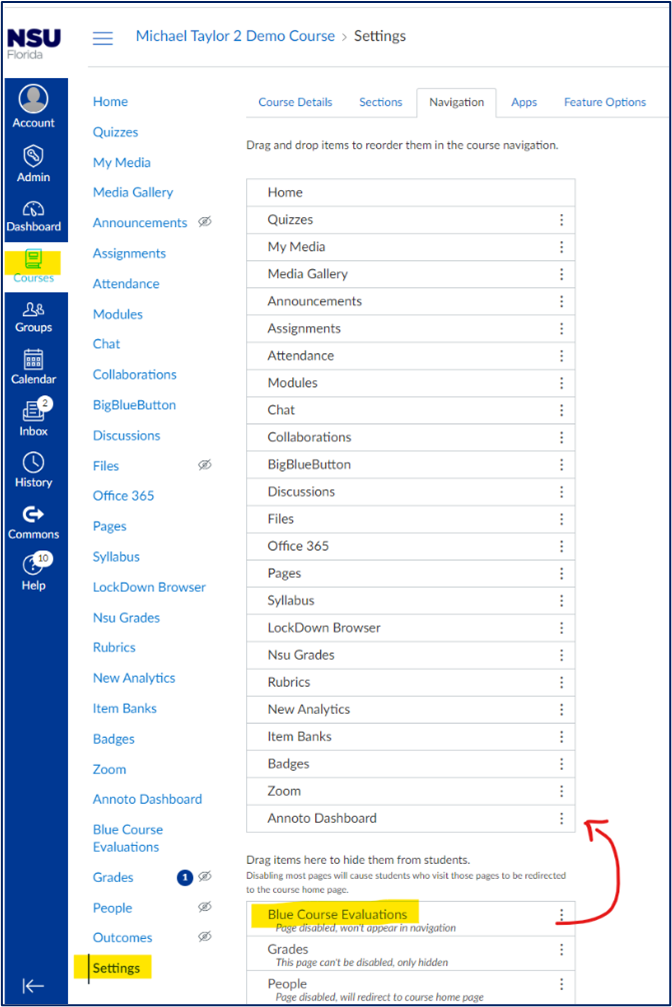
- Select Settings.
- Select the Navigation
- Drag Blue Course Evaluations from the “Drag items here to hide them from students” section to the “Drag and drop items to reorder them in the source navigation” section.
- Click Save at the bottom of the page.
- Blue Course Evaluations will now appear for students in the menu navigation.
Note: This must be repeated for every course in which an instructor wants their students to have access to course evaluations within Canvas.
Explorance Instructor Help Guide
Explorance Blue Academic Administrator
Dr. Kathleen Hagen
Director – Faculty Development, HPD
Email: khagen@nova.edu
SharkLink
SharkLink is NSU's online portal. With a single username and password, students, alumni, faculty, and staff members can easily access many online university applications.
Quick Guide
Students (PDF)Microsoft Online Archive
Faculty and Staff (PDF)
Current Hours of Operation
Monday-Friday: 8:30 a.m. – 5 p.m.
Saturday: Closed
Sunday: Closed
Closed on University Holidays
Holiday Schedule
Help Number for Students:
(954) 262-4357
Toll Free:
800-541-6682 ext. 24357
Help Number for Staff:
(954) 262-0070